Connect Claude or ChatGPT to your booking agenda
With the agend.pt connector, ask about and run your agenda from Claude or ChatGPT. Setup steps, real examples, safety and the plan that includes it.

You probably already use ChatGPT or Claude to draft a tricky reply, summarise an email or sort out an idea. But when you need to know what is booked tomorrow, you go back to the dashboard, find the day and click around. Your agenda lives in one place and your AI conversation in another.
You can now put them together. The agend.pt Claude and ChatGPT connector links your account to the AI app you already use. From then on, the conversation can look things up and manage your agenda: bookings, customers, services, opening hours. In Claude and ChatGPT, every change waits for your approval.
What is the Claude and ChatGPT connector?
It is a bridge between your agend.pt account and an AI app. Technically it is an MCP server (Model Context Protocol), the open standard AI apps use to plug into other software. For you it comes down to this: paste an address, authorise it, and your AI can see your agenda and change it, with the same tools as the dashboard assistant.
It works with Claude, ChatGPT, Claude Code, Cursor, pi and any other MCP-compatible app.
Why bother, if the dashboard already has an AI assistant?
Because your agenda stops being an island. Claude and ChatGPT already do things agend.pt does not: read your emails, open your documents, do the maths, draw charts. With the connector, you use all of that and your agenda in the same conversation:
- Business questions. "Which services got the most bookings in September?" The AI reads the bookings and does the counting.
- Email and agenda together. If your AI app is also connected to Gmail, ask it to read a customer's request and book it.
- Documents and charts. Summaries, tables and charts built from your real agenda data.
- One place. No switching screens: you stay in the conversation where you already think and decide.
Dashboard assistant or connector: which one?
You do not have to choose. They use the same tools and the same rules; what changes is where you talk.
| Dashboard AI assistant | Claude / ChatGPT connector | |
|---|---|---|
| Where it lives | Inside the agend.pt dashboard | In the AI app you already use |
| Voice | Yes | Depends on the AI app |
| Email, documents, charts | No | Yes, if the app has those connections |
| Best for | Quick answers with your hands full | Managing and analysing the agenda alongside the rest of your work |
The details of the built-in one are in the post on the AI assistant for your booking agenda.
How to connect it, step by step
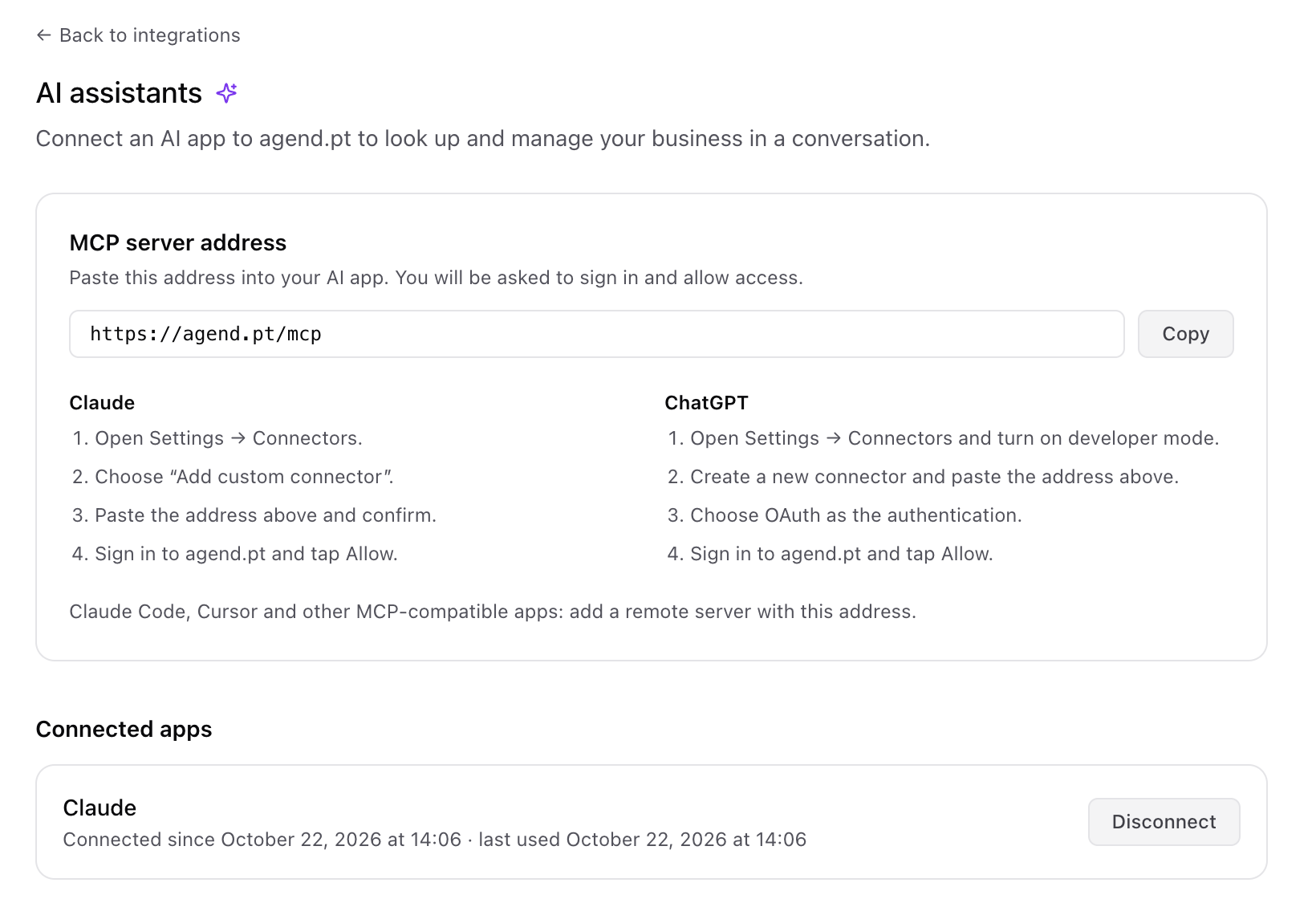
Before you start, open Integrations → AI assistants in agend.pt and copy the address: https://agend.pt/mcp. That is what you paste into the AI app.
In Claude
- Open Settings → Connectors.
- Choose Add custom connector.
- Paste the address and confirm.
- Sign in to agend.pt and tap Allow.
In ChatGPT
- Open Settings → Connectors and turn on developer mode.
- Create a new connector and paste the address.
- Choose OAuth as the authentication.
- Sign in to agend.pt and tap Allow.
In other apps (Claude Code, Cursor, pi)
Add a remote (HTTP) MCP server with the same address. The sign-in opens in your browser.
Custom connectors only exist in the versions of Claude and ChatGPT that support them, and menu names change from time to time. If you cannot find the option, look for "connectors" or "MCP" in your AI app's settings.
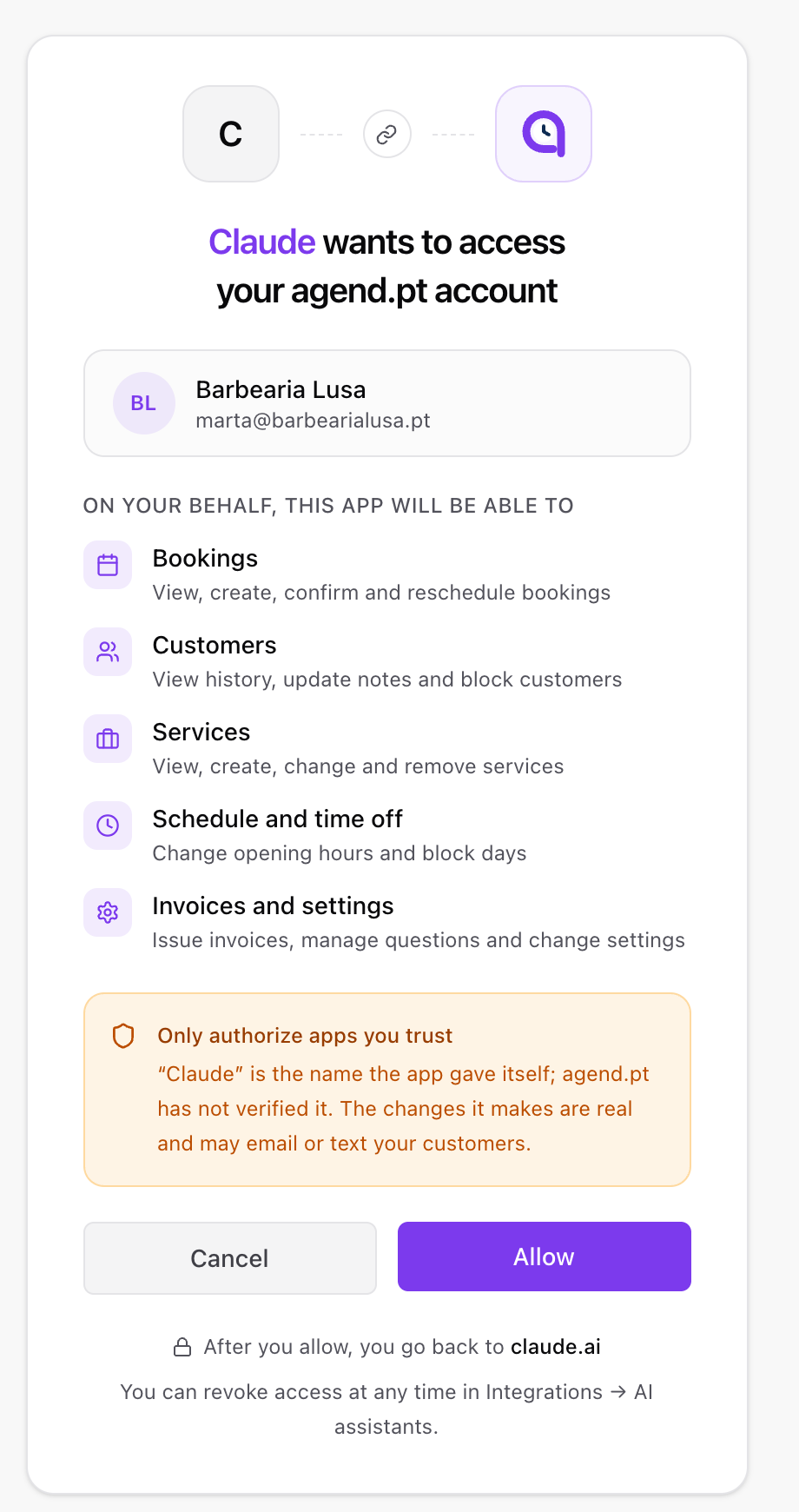
When you tap Allow, you see this page: the app, your account and what the app will be able to do. Your password is never handed to the AI app: you sign in on agend.pt itself.
Real examples: what you type and what happens
No commands to memorise. You write the way you would talk to a receptionist. These examples show what the AI does in agend.pt at each step. Names and amounts are made up.
Ask your agenda
What do I have booked tomorrow?
You have 6 bookings. The first is at 09:30 (Haircut, João Ferreira) and the last at 17:45 (Beard trim, Tiago Matos). You are free between 12:30 and 14:00.
When is the next slot for a 60-minute massage with Rita?
The next slot is tomorrow at 15:00, with Rita. Shall I book it?
Handle requests and bookings
Any requests waiting for a reply? Accept tomorrow morning's.
You have 3 requests. Two are for tomorrow morning: Ana Costa (Haircut, 10:00) and Miguel Sousa (Beard trim, 11:15). I will confirm them.
Done. Ana and Miguel are confirmed. Thursday's request is still open.
Book a haircut for Pedro Santos on Friday at 3 pm.
Booked: Haircut, Pedro Santos, Friday at 15:00, €15. If that time had been taken, I would have told you first.
Close the agenda from 4 to 15 August for my holiday and tell me who is booked on those days.
Agenda closed from 4 to 15 August: no new bookings can come in. The ones you already had are still there, 3 of them:
- Sílvia Pinto, 5 Aug, 10:00
- Hugo Lopes, 5 Aug, 16:30
- Carla Neves, 12 Aug, 11:00
Want me to propose another time to them?
Run the business
Create the service "Haircut + Beard", 45 minutes, €25.
Created: Haircut + Beard, 45 min, €25. It is now in your service list.
Issue the invoice-receipt for Ana's booking today.
Invoice-receipt issued for Ana Costa's 10:00 booking (Haircut, €15).
Combine it with the rest of your AI app
This is where the connector pays off. The next examples also use abilities of the AI app itself (Gmail, drawing charts). In those steps, agend.pt only supplies and saves the agenda.
Read Joana Matos's latest email and book what she asks for.
Joana asks for a 60-minute massage on Thursday afternoon. Rita is free at 16:00.
Booked: Relaxing massage, Joana Matos, Thursday at 16:00, €45. Want me to draft a reply?
Summarise September's bookings by service and make a chart.
You had 84 bookings in September:
- Haircut: 51 (61%)
- Beard trim: 22 (26%)
- Haircut + Beard: 11 (13%)
Here is the bar chart.
Start by asking. For the first few days, stick to read-only requests ("what do I have today?", "who did not show up this month?"). Once you feel at ease, move on to changes.
What it can and cannot do
It can look up: bookings in a date range, pending requests, customers and each one's history, services, the waiting list, your team, SMS balance, opening hours, team hours, the next free slot, time off and booking-form questions.
It can change (with your approval):
- bookings: create, confirm or decline a request, propose a new time, reschedule and mark a no-show;
- invoices: issue or void one (InvoiceXpress or FIZ);
- time off: block, open, change and remove it, for the business or for one team member;
- services: create, change and delete;
- booking form: answers and questions, including asking for missing answers by SMS or email;
- opening hours for the business and the team, customer notes and blocking, activating or deactivating a team member, business settings.
It cannot: send free-form messages to your customers, run marketing campaigns, handle payments or refunds, or produce reports of its own. The AI app can summarise, count and chart what it read, but agend.pt has no analytics report to hand it.
Is it safe? Consent, approvals and permissions
An AI with access to your agenda has to be easy to control. The connector is built for that.
- You authorise it. Sign-in happens on agend.pt with your usual login. Your password never goes through the AI app. Before you tap Allow, you see what the app will be able to do.
- You revoke it any time. In Integrations → AI assistants you see the connected apps and disconnect any of them with one tap. Access expires after 1 hour and renews itself for as long as the connection exists.
- You approve each change. Claude and ChatGPT ask for your approval before each change. Some coding tools run actions automatically: if you use one, check its settings for how you want it to behave.
- Your team stays limited. A team member only sees their own bookings, exactly as in the dashboard. What is owner-only stays owner-only.
- It reads only what it asks for. The AI app reads only what you ask it, through the tools, at the moment you ask. What it reads becomes part of that conversation, so it is worth knowing the privacy rules of the app you use.
Changes are real. Confirming a booking or proposing a new time can send an email or an SMS to the customer. Read the summary before you approve, and only authorise apps you trust.
Which plan includes it?
The connector is included in the Pro plan. It is not on the Free or Premium plans. On the AI side, you need a version of Claude or ChatGPT that supports custom connectors. See the pricing page for the plans.
If you are on Free or Premium, the AI assistants page shows you how to try Pro.
Frequently asked questions
Does the AI app see my password? No. You sign in on agend.pt and the app receives only an authorisation, which you can revoke.
Can I use Claude and ChatGPT at the same time? You can connect both, or more. Each one shows in the list of connected apps and you disconnect them separately.
Do I need to know what an MCP server is? No. It is the technical name. For you it is an address you paste and an Allow button.
Can the AI delete things by mistake? In Claude and ChatGPT, it proposes and you approve. If something is not what you meant, do not approve it and say it differently. Still, always read what you are about to approve, especially when deleting services or changing opening hours.
What happens if I disconnect the connector? The app stops seeing your agenda straight away. Your agenda and your customers stay exactly as they were.
Summary
- Connect Claude, ChatGPT or another MCP app to agend.pt by pasting an address and tapping Allow.
- You write in plain language; the AI looks up and changes the agenda, and adds what it already does well: reading emails, summarising, drawing charts.
- In Claude and ChatGPT, every change goes through your approval; your password never leaves agend.pt, and you can revoke access whenever you like.
- Included in the Pro plan.
If you do not use agend.pt yet, see how the booking page works for barbers and other professionals, and try Pro: your agenda starts speaking your AI's language.